Studio management software
Studio management software for photo and video studios.
Studio management software is a shared home for client work: the project, the files, the scope, the proofing and the sign-off. Studioscope is for photography and video teams who deliver to clients. Print CRMs, dance-class schedulers and film-set ERP are different jobs – keep those specialist tools.
Run the studio around the work – not ten tabs around the work.
The short version
Selling prints from a gallery, or running call sheets on a film set? Keep the specialist tool. Running a photo or video studio that needs the project, the files, the scope and the sign-off in one place? That is studio management software.
What is studio management software?
Studio management software is a shared home for the work and the business around it.
For a photography or video studio, that usually means every client project in one place, files and deliverable versions on the project they belong to, a clear scope the client can see before work balloons, review and sign-off in the browser, and a client portal so they only see their work – nothing to install.
It is not the same as a generic project board. Asana and Trello track tasks; they do not know what a deliverable version, a client approval or a signed scope is.
It is not the same as a gallery CRM. Tools built for booking and print sales are strong at the front of the funnel and weaker the moment the job is a video cut, a revision trail or a signed-off final that has to stand up later.
It is not the same as film and TV production ERP. Call sheets, stripboards and broadcast crew ops are a different machine. Most boutique photo and video studios need the path from brief to approved delivery – without the WeTransfer shuffle.
Studioscope sits in the gap: studio management for creatives who deliver to clients.
The origin story and a product walkthrough live in Studioscope, an introduction.
Who it is for
Studio management software earns its keep when more than one person – or more than one tool – touches the job.
Photographers – every shoot from RAW to approved final, with selects and sign-off in a portal clients can open. A clear project scope is usually the first thing that stops a wedding or commercial package growing a fourth cut.
Video studios – footage, browser-based client proofing, versioned cuts and an audit trail of approval. Deliverable versions stay attached to the cut the client actually signed off.
Designers and agencies – concepts, feedback and isolated client projects with the same delivery and approval pattern.
If your week is still "Drive folder + WhatsApp + email + a gallery link + a spreadsheet for the quote," you are already running a studio management stack – just an inefficient one.
Photography studio management software
Photography studio management software has to cover the job after the enquiry is won: the shoot, the RAWs, the selects, the retouching rounds and a final the client has actually approved.
The usual pain is not booking the date. It is reconstructing where a job got to – Drive for RAWs, a gallery link for selects, WhatsApp for 'can we tweak the colour?', a spreadsheet for the quote. Studioscope keeps those on one project so a Tuesday in October still has the signed package and the approved version attached.
For the photographer-specific walkthrough – weddings, portraits, commercial stills – see photography studio management. This page stays on the category: studio management software for photo and video delivery, not a second copy of that use case.
Video studio management software
Video studio management software is the same container with a production-native review loop: versioned cuts, browser playback, notes on the frame, and a trail of who signed what.
If the pain is WeTransfer plus an email thread of timestamps, start with the video production workflow and the approvals feature. Keep Frame.io only if you need camera-to-cloud or an Adobe panel – the Frame.io comparison spells out that split.
How to choose studio management software
A mixed search for this category will surface print CRMs, class-studio tools, film ERP and review-only products. Use the job, not the label.
Choose studio management software when the work is client delivery: a project, files on that project, a scope the client can see, proofing in the browser, and a recorded approval. Choose a gallery CRM when print sales and booking are the business. Choose a class platform when the studio sells memberships. Choose film production software when you need call sheets and stripboards.
Useful criteria, without a fake ranking: does the client review in the browser, on a specific version? Does the signed scope sit on the same project as the files? Can clients use a portal without a seat fee? Is there a free plan honest enough to run one real job? Studioscope is built for that delivery pattern – see pricing for current limits, and compare for tools you already pay for.
The useful core
What good studio management software includes
Not every product under this label covers the same surface. For studios shipping work to clients, these are the pieces that matter.
Projects as the container
Brief, people, files, scope, chat and deadlines live together so context does not leak into five apps.
Files and deliverables
RAW, selects, finals and cuts on the project. Clients approve a specific version – not whatever is latest in the folder.
Scopes and quotes
Write what is included, send it, and keep it next to the work. Scope creep is usually an unsigned conversation.
Client proofing and approvals
Review in the browser, notes on the right version (and frame), then approve or request changes – on the record.
Scheduling
Shoot days and review calls sit next to the project, not in a calendar nobody else can see.
A real client portal
Clients log in and see only their projects. No shared Drive permissions, no guessing which link was final.
Studio management vs the tools studios already use
Galleries and print CRMs (Pixieset, Studio Ninja) excel at booking, galleries and print sales. Studio management takes over for project scope, video review and versioned sign-off.
Review tools (Frame.io) are strong for frame-accurate notes in post. Studio management adds signed scope, a full client portal and flat pricing that fits a small studio.
Client admin (HoneyBook, Dubsado) handle proposals and invoices well. Studio management owns creative delivery – files and proofing on the same project.
Generic project tools (Asana, Notion, Monday) track tasks. They do not give you deliverable versions, client roles or an approval audit trail.
Film production platforms (Yamdu, farmerswife) are built for crew and stripboards. That is usually overkill for boutique photo and video client delivery.
Short version: keep a print store if you sell prints. Keep a specialised post tool if you are a finishing house. For the studio that shoots, delivers and gets paid, studio management software should own the project. Compare vs Pixieset, vs Frame.io, vs HoneyBook and vs Dubsado.
How Studioscope does it
The work and the deal in the same place
Open the project
People, brief and kit in one place – the container for everything that follows.
Scope what is included
Write the package before the work stretches, and keep the agreement visible to the client.
Upload and version deliverables
Stills and video, streamable in the browser, with a clear history of exports.
Invite the client to review
They open their portal, watch or browse the work in the browser, and leave notes on the right version.
Reviews and approvals
Clients approve or request changes on the exact cut or select – every decision stays on the trail.
Invoice the agreed work
When everyone agrees on what was delivered and what it costs, invoice from the same project – work done and price in sync.
The actual software
What it looks like on a Tuesday.
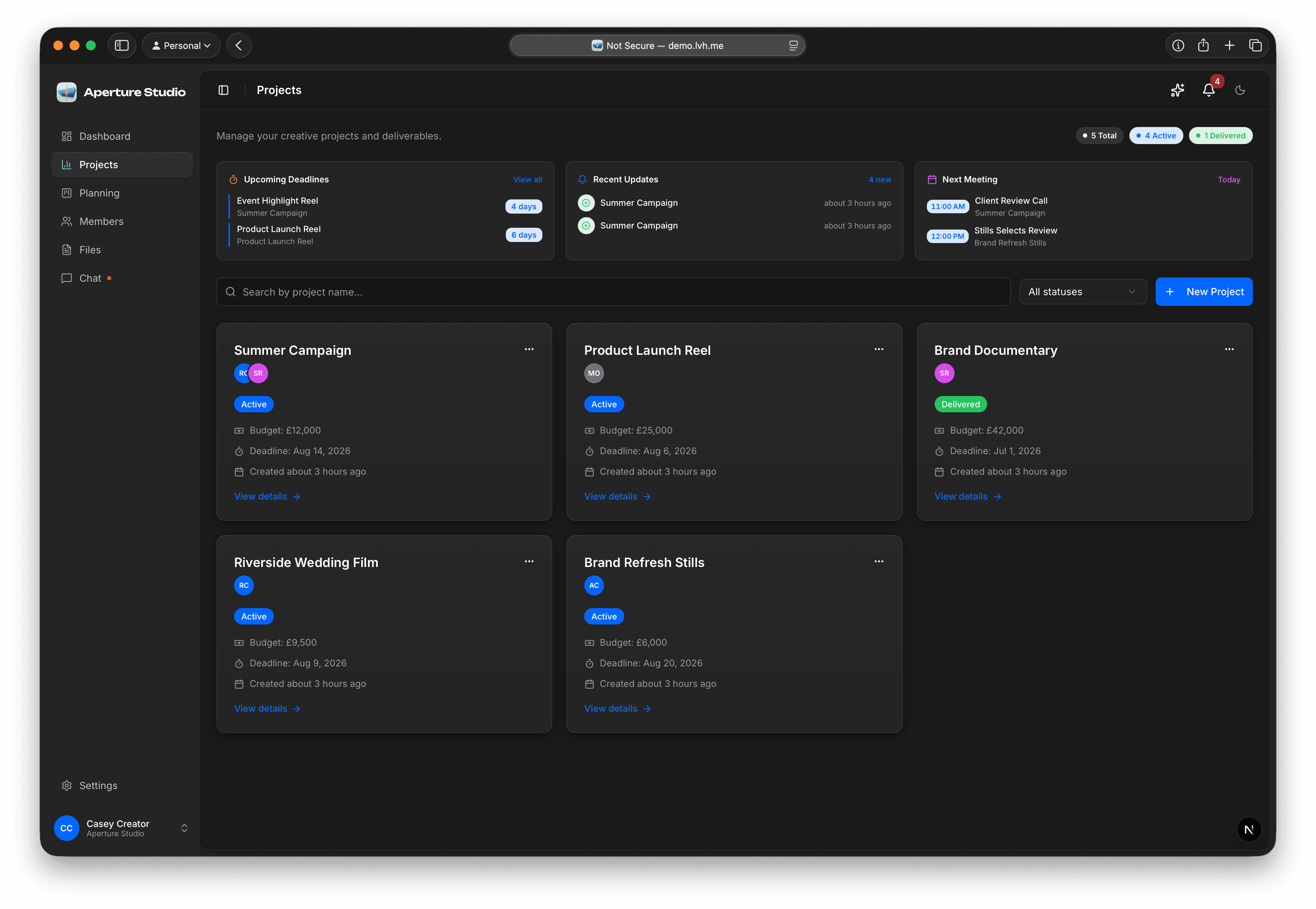
Projects
Every job is a project, and the project holds everything.
Brief, people, kit, files, scope, chat and dates in one container. Open a job six months later and the context is still attached to it.
- One list of live work, not one per tool
- Staff and clients see the same project, scoped to their role
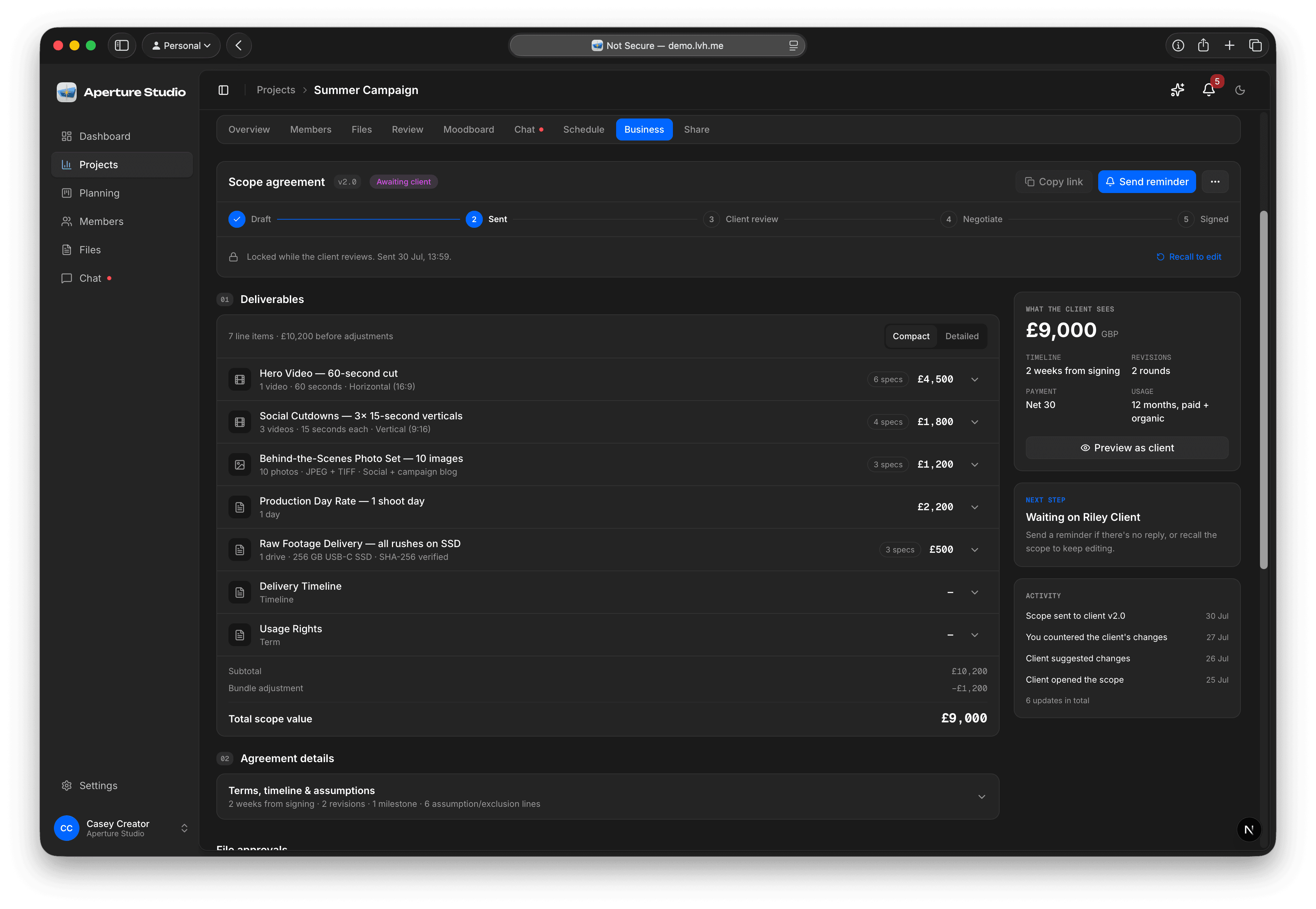
Scopes
The deal, written down, sitting next to the work.
Build the package, send it, and keep it on the project. When a request arrives that was never in the scope, the scope is the thing you both already read.
- Line items, totals and terms the client signs
- Signed scopes stay attached to the project they cover
Review and approval
Clients approve a version, not a vibe.
Upload a new cut or select and it becomes a numbered version. The client opens their portal, watches it in the browser, and approves or asks for changes on that exact version.
- Versions stack up with a readable history
- Every decision is recorded against the version it was about
Schedule
Shoot days on the project, not in someone's head.
Add milestones as fast as you can type them, apply a template for a job shape you run often, and let the team subscribe to the dates in their own calendar.
- Milestones and shoot days live on the project
- Team members subscribe from Apple, Google or Outlook
By studio type
Studio management that matches how you work
Photography studio management
Shoots organised, selects in the browser, packages scoped up front and sign-off you can prove when 'can we tweak it again?' shows up.
Video production workflow
Client proofing without WeTransfer, notes on the frame and a trusted version history – studio management with a production-native review loop.
Designers
Moodboards, drafts and feedback on the same project so revision chaos stays visible and sign-off is unambiguous.
Agencies
One console per client project: files, scope, approvals and schedule, without mixing clients together.
Pricing that does not punish collaboration
No seat fees for client collaborators. Flat plans so a growing studio is not charged extra for inviting the people who need to see the work. Start free, then pay for the storage, downloads and video minutes you actually use. Full breakdown on the pricing page.
Studioscope maps the core of studio management to Files, Scopes & quotes, Approvals, Schedule and Your brand. How a shoot day actually lands on the project is in a real schedule and team permissions.
The operating system for the studio
Studio management software should feel like the studio's operating system – not another tab you forget to open.
If the brief, the files, the scope and the sign-off already live in different places, consolidating them is the highest-leverage change most small studios can make.
FAQ
Studio management software, answered
What is studio management software?
Is studio management software the same as project management software?
Do photographers need studio management software or a CRM?
Is Studioscope production management software for film sets?
Can clients use Studioscope without installing anything?
How is Studioscope priced?
Is there a free studio management software plan?
What should I look for in photography studio management software?
From the notes
How studios actually run the work
Studioscope, an introduction
Three short videos: files, versions, reviews, schedule and scope.
A clear project scope
Scope creep starts when the work you sold is left open to interpretation.
Deliverable versions and real thumbnails
Version history attached to the exact cut the client signed off.
A real schedule and team permissions
Shoot blueprints, a client-visible timeline, and teammates scoped to their jobs.
Keep going
See Studioscope in your workflow
Photography studio management
One home for every shoot, from RAW to approved final.
Video production workflow
Browser-based client proofing on every cut and sign-off.
Studio management features
Files, scopes, approvals, schedule and branding.
Compare alternatives
Pixieset, Frame.io, HoneyBook and Dubsado, side by side.
Now open. Founding studios keep the price they join at.
Folders, scopes, and sign-offbefore the next shoot.
Free to start · founding price locked · no card required
Not ready yet? Get product updates.