Photography studio management
Photography studio management software, from RAW to final.
Photography studio management without the gallery–Drive–email shuffle. Each shoot's files, selects, scope and sign-off stay together – clients review and approve in a portal, without the back-and-forth.
You already have a studio management system. It's just made of six apps.
Most photographers I talk to run the same stack without ever deciding to. The shoot gets booked over email. The RAWs go on a drive, then a second drive. Selects go up as a gallery link. Feedback comes back as a WhatsApp voice note and three replies to an old email thread. The quote lives in another email. And the invoice happens a fortnight later, from memory.
None of that is a failure of organisation. It's what happens when every stage of a shoot needs a different tool and nothing joins them up. The cost isn't the tools – it's the half-hour you lose every time you have to reconstruct where a job got to.
Why photographers use it
Built for the way you shoot and deliver
Every shoot, organised
RAW, selects and final edits live on the project they belong to, not scattered across drives and gallery links.
Selects in the browser
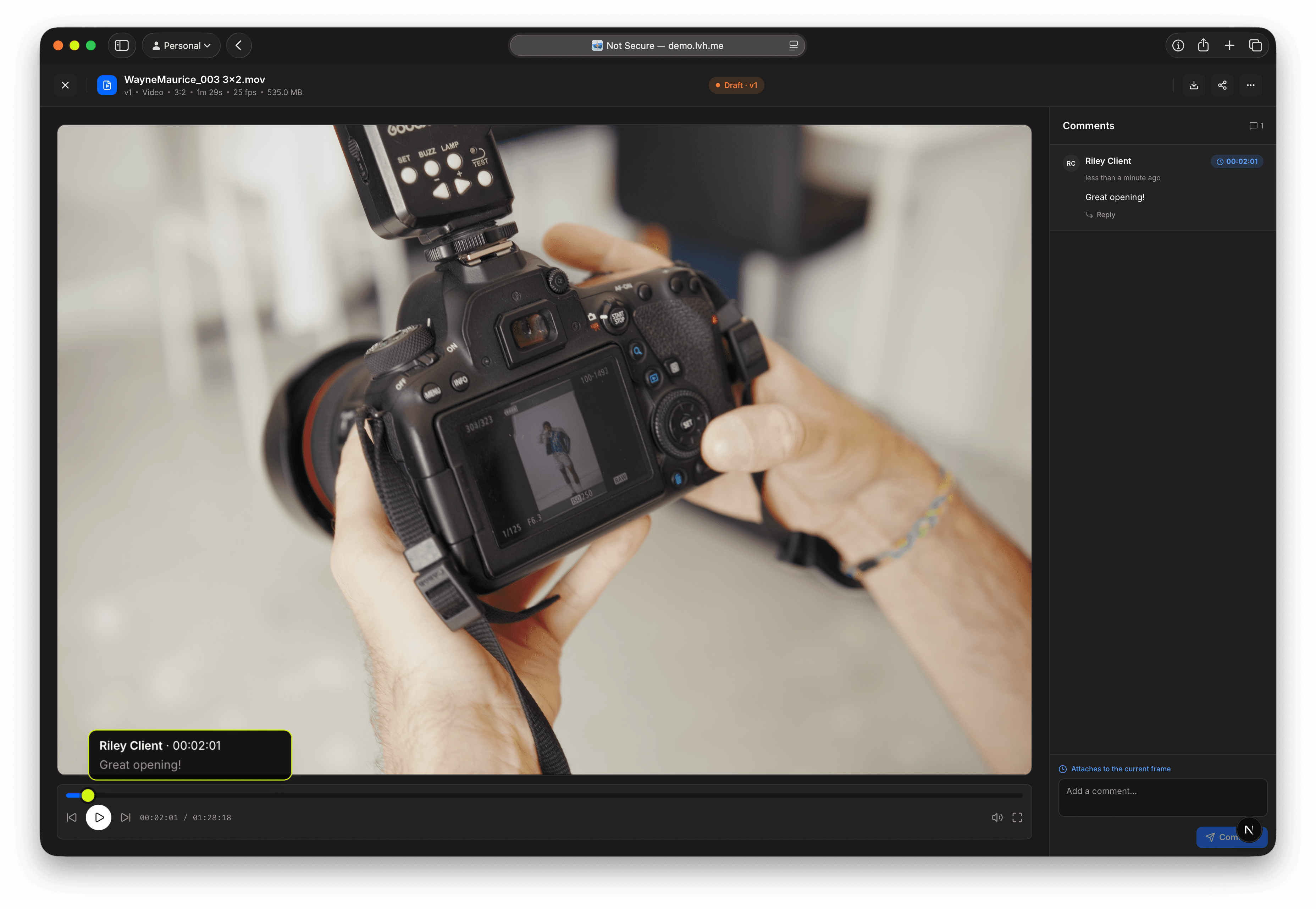
Clients view and comment on images and cuts in their portal, with notes landing on the exact version.
Sign-off you can prove
Clients approve the final from the same screen, and every decision is recorded – handy when 'can we tweak it again?' comes up.
Scope the package
Lay out shoot days, edits and revision limits up front so extra retouching is billed, not absorbed.
A portal clients can open
Invite a client and they see only their shoots – review, notes and approval in the browser, nothing to install.
Kit that's accounted for
Track bodies, lenses and lighting so you know what's going out the door for every booking.
One shoot, start to finish
What a wedding actually looks like in here
Before the day
The couple become a project. The scope goes out first: ten hours' coverage, two shooters, 400 edited images, two rounds of revisions, albums quoted separately. They read it, they sign it, and it stays attached to the project. When someone asks in October whether albums were included, the answer is on the job rather than in your inbox.
After the day
RAWs upload to the project. You cull, you edit, and the selects go up as a version – not a link, a version. The couple get an invite and open a portal that has their wedding in it and nothing else. No shared Drive permissions to get wrong, nothing to install, no password to reset at 11pm.
The revision round
They leave notes on specific images. You re-export, and that becomes version two. Version one is still there. When they say “could we go back to how the ceremony shots looked before?” – you can.
Sign-off
They approve version two, recorded against that version with a timestamp and a name. Six weeks later, when a request arrives to “just tweak a few more”, you're not arguing from memory. You're pointing at the scope they signed and the version they approved, and deciding whether to bill for the extra round or do it as a favour. Now it's a decision, not a default.
Scope creep is mostly an admin problem
Revision rounds are where photography margin quietly disappears, and it rarely happens because a client is difficult. It happens because nobody wrote down how many rounds were included, so the third one feels as reasonable as the first.
Studioscope's answer isn't a harder contract. It's that the scope, the work and the sign-off sit on the same project, so the conversation has something to refer to. Clients are usually reasonable when the terms are visible. It's ambiguity that costs you.
How to name the unit instead of the vibe is the whole of a clear project scope puts everyone on the same page. Retouching hours, extra shoot days, rush delivery, album design – quote them as line items up front and they're billable. Leave them implied and they're absorbed.
Where you'll still want another tool
Studioscope isn't a print store. If selling prints and albums through a consumer gallery is a real part of your income, keep Pixieset or your gallery of choice and use Studioscope for the project, the scope and the sign-off.
It isn't a booking CRM with lead capture and enquiry funnels either. If your business runs on inbound enquiry volume, a tool built for the front of the funnel will beat us there.
What it does own is the middle: everything between “yes, let's do it” and “approved, invoice me”. That's the part currently spread across six apps.
Versioned selects – so an older gallery is still there when someone asks to go back – shipped as deliverable versions and real thumbnails. The broader category, if you also shoot video, is studio management software.
FAQ
Photography studio management, answered
Is this a gallery for delivering photos to clients?
Can I use it for a solo practice, or is it for teams?
What happens to my RAWs?
How many revision rounds should I scope?
From the notes
How photographers actually keep a job on the rails
A clear project scope
Scope creep starts when the work you sold is left open to interpretation.
Deliverable versions and real thumbnails
Version history attached to the exact cut the client signed off.
A dashboard built around what's blocking you
A decision queue, studio-branded email, share links and live calendar feeds.
Studioscope, an introduction
Three short videos: files, versions, reviews, schedule and scope.
Other studios
See how it fits your kind of work
Now open. Founding studios keep the price they join at.
Folders, scopes, and sign-offbefore the next shoot.
Free to start · founding price locked · no card required
Not ready yet? Get product updates.