Client review, approval and delivery for photo and video studios.
Free forever on one project · no card
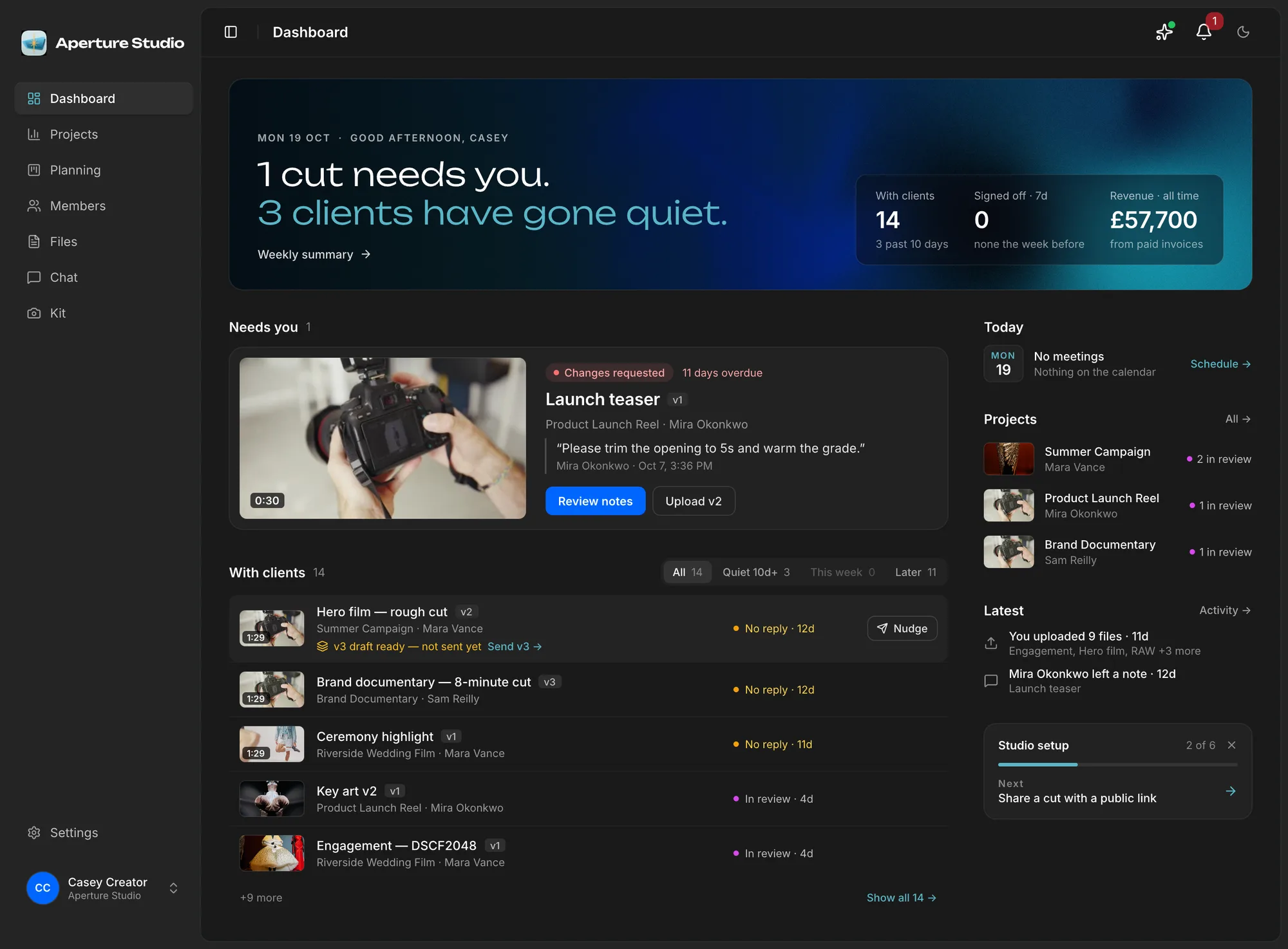
Close these tabs.
Nine apps to run one shoot. Here’s what does each job instead.
- WhatsAppWhatsApp
- GmailGmail
- WeTransferWeTransfer
- DriveGoogle Drive
- DropboxDropbox
- Frame.ioFrame.io
- SheetsSheets
- DocuSignDocuSign
- CalendarCalendar
Early reviews
Read what the studios using it, and their clients, are saying.
From the studio
“Studioscope has scratched a massive itch for my OCD when it comes to organising my business.”
From the client side
“Bobby’s platform made reviewing and approving our videos really straightforward. Having the edits, feedback, downloads and payment in one place kept everything easy to follow.”
Reviewed and approved video work as a client
Approvals
Get approvals quickly.
Clients get an email the moment a new version drops. Anyone you share it with opens one link and comments on the frame, with nothing to download and no login. Your client approves the exact version, and you know the moment they do.
- Notes pinned to the frameEvery comment carries its timecode and version — no more “the bit around 40 seconds”.
- Versions that can’t be confusedv3 is v3. Approvals stick to the exact cut your client saw.
- Know the moment it’s approvedGet pinged the second a client approves — who said yes to what, and when, kept on the record.
Brand film – 90sv3
Final master · 4K ProRes
Illustrative preview — approvals lock to the version your client saw.
Everything here used to be a separate subscription.
Files, scopes, approvals, schedule and brand, handled on the project. Studio management software for photo and video.
Notes
- Bulk release, folder upload, and a redesigned dashboard
- Switching Studio Software Without Setup Pain
- Summary email, app install, account deletion
- Share links, a weekly summary, and in-app feedback
- Pricing Guide: Usage, Kit, and Creative Fees
- Browser notifications, and an app that feels native
- Priced quotes, a kit inventory, and a faster Files & Review
- Captions, playback fallbacks, and client sign-off alerts
- A dashboard built around what's blocking you
- Quickly setup a schedule, roles & permissions for your team
- Studioscope, an introduction
- Deliverable versions, client threads, and real thumbnails
- A clear project scope puts everyone on the same page
- Studioscope is here!
How a job moves through the studio.
Free until you need more than one project.
Upgrade when you want more storage, a custom domain, or more than one client on the project. Overage is metered on the invoice.
Founding offer: The first 5 studios keep the price they join at, locked for as long as they stay. Four seats are still open.
Paid plans include storage, downloads and video minutes. Go over and you pay metered overage only: £0.04 per GiB, £0.10 per GiB, and £1.50 per 1,000 min. Billed in whole GiB / minutes on your next invoice.

From the maker
I built Studioscope for myself first.
Hi, I’m Bobby. I spent over a decade in feature animation and VFX, where every studio I worked at had a pipeline: you always knew which version was current, who had signed it off, and where the file lived. Then I went freelance and all of that vanished. The industry that had solved this for hundred-person crews had nothing for a studio of one.
So I made the thing I wished I had: files, feedback, the scope and the client sign-off on the same project. I built it for my own projects first, and somewhere along the way it stopped being a side project and started running my work. My clients liked it enough that I kept going.
Studioscope is new, and I won’t pretend otherwise. I’m bringing the first 5 studios on by hand, myself: we’ll set yours up together on a call, and the price you join at stays locked for as long as you’re around. Join now and you get me on the other end of it, and a real say in where this goes next.
Boyan (Bobby) Georgiev · photographer & filmmaker
Have a look at my workFAQ
Questions, answered
What is Studioscope?
Who is Studioscope for?
Do clients need to install anything or pay for a seat?
How do client approvals work?
Is there a free plan?
Can I move my existing work in?
Who owns my files, and where are they stored?
How is client data kept separate?
Can I upload large ProRes or RAW files?
Now open. Founding studios keep the price they join at.
Folders, scopes, and sign-offbefore the next shoot.
Free to start · founding price locked · no card required
Not ready yet? Get product updates.